
Cache It If You Can: Practical Guide to Types of Caches for Developers

In the last decade, we have all witnessed how fast the modern-day applications have evolved, and with the ever-increasing user bases, these apps cater to millions and billions of users every year. With this rapid increase in the user base, the one crucial thing that can not be negotiated with is the performance of these applications.
One good example is Netflix. Have you ever thought about how Netflix manages millions of play requests at the same time, and yet the user never has to wait for the streaming of their favourite movie?
As developers, we are bound to get curious about the seamless working of Netflix and what tools and techniques it uses so that we can also improve our app’s performance.
Coming back to the case of Netflix, the answer to its flawless performance lies mainly in Caching. Netflix makes use of caching wherever possible and has multiple caching layers, from local device caching to CDN or distributed caching to server-side caching. It uses them all to make the response of that play button click lightning fast.
So in this article, I am going to discuss in detail the types of caches and where and how we can implement them to make our applications faster. And along the way, talk about some common queries that we get while working with caching. For example, when should you use a cache vs just optimising the database?
To answer this simply, you should always focus on optimising the database first, fixing slow queries, and adding proper indexes. And after that, if you are getting huge numbers of Database hits, then it will be the right choice to implement caching. Now we move on to our next topic.
What is Cache?
To define Cache in a simple way, we can say a cache is a high-speed storage space that stores frequently accessed data for its quick retrieval. As the data retrieval process is slow when the data is retrieved from its original slow source, such as disk, Database or remote server, cache provides a faster alternative for getting the data. I will discuss in detail the types of caches and in how many ways they can be bifurcated depending on their place of implementation.
But before that, I want to shed light on the why part of it. So why should it matter to you as a developer?
In totality, Caching will help you to provide better and faster solutions for your project. Caching will reduce the latency as it will serve the responses in microseconds, as compared to milliseconds if the data is fetched from disk or a remote server. It will help in avoiding repeated calls to the database, resulting in lower infrastructure load. With the use of caching, your application can easily cater to millions of users, achieving scalability easily.
With this, we can answer another common query regarding caching and that is: Should I cache everything, or only expensive queries?
And the answer to that is no, you don’t have to cache everything, as it will lead to a waste of memory. A good rule of thumb is that you should cache frequently accessed data along with the queries that are expensive to execute. And please avoid caching highly volatile data.
Types of Caches
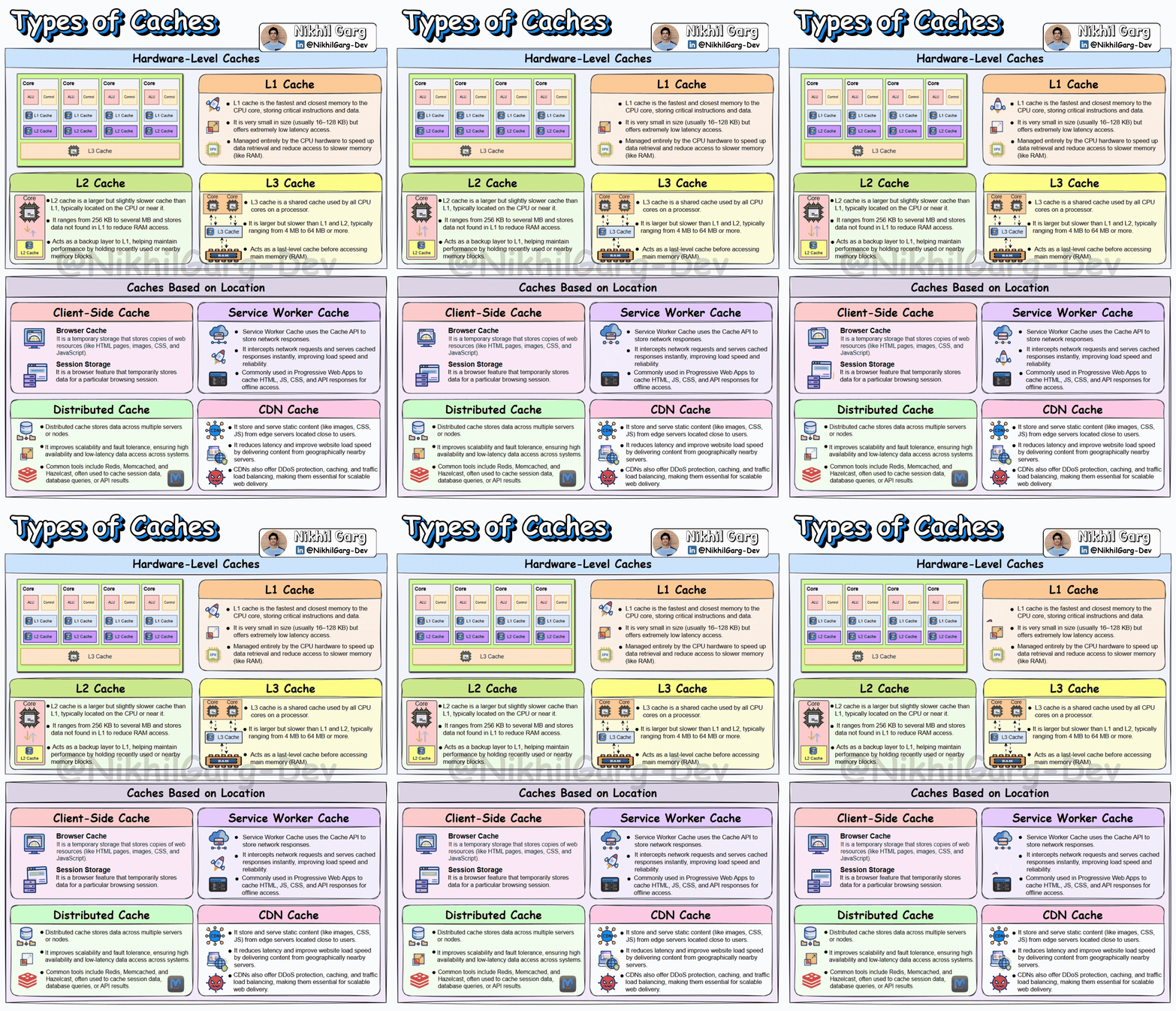
We can divide caches into mainly two ways: first, the hardware-level cache and second, caches based on the location where they are implemented.
Hardware-Level cache
Cache at the Hardware level is a small, fast memory storage inside the computer. It stores a copy of the data from the main memory, which is very commonly accessed. Cache memory is placed closer to the CPU to quickly fetch the data. The closer the cache is to the CPU, the faster the data retrieval. There are three types of cache memory:
L1 Cache: It is the first level of the cache memory and is closest to the CPU, which is situated inside the processor itself, near the cores. It is very small in size and in the range between 16 and 128KB. Due to its closeness to the CPU, it is extremely fast and low latency.
L2 Cache: This is the second-level cache memory, which is placed inside the CPU core. It is slower than the L1 cache but is larger in size. Its memory size ranges from 256KB to several MB.
L3 Cache: This is the third level of the cache memory and is situated outside the CPU and is shared by all of the CPU’s cores. It is the last level of Cache before the CPU accesses the RAM. It is slower than L2 Cache but is larger in size, with a range between 4 and 64 MB.
Caches Based on Location
In a distributed system, caches can be used at various layers to enhance the performance of the application. Let’s discuss where and how they are used.
Client-side Cache
Browser cache: As the name suggests, the browser cache is the storage space created on the device by your browser that is used for storing resources like images, stylesheets and scripts. So that in case you revisit the site, the browser can load these from the cache rather than downloading them again.
Session Storage: It is used to store session-based data within a web browser. The data is stored as a Key-Value pair and persists across the same tab or window, and is cleared when the tab or window is closed.
Service Worker cache
Service worker cache is a local storage that can be programmed for storing web application resources like HTML, CSS and images. The storage mechanism can be fully customised by JavaScript, which helps the developers to implement custom caching strategies. Service worker cache intercepts requests and stores responses that support offline access.
Distributed Cache
Distributed cache is a concept in which the frequently accessed data is stored across multiple servers or nodes. By storing the data in various nodes, a system can be highly reliable, fault-tolerant and have low latency. Some of the common tools used for distributed caching are Redis, Memcached and Hazelcast. These are used to store data such as user session data, API results and Database queries.
CDN Cache
CDN is a mechanism of serving the content to the user that makes use of a network of globally connected servers known as a Content Delivery Network. CDN stores a website’s static data, such as images, CSS, JS, in its closest server to the user. The process goes like this- when a user requests a web page for the first time, the request directly goes to the original server of the website. When the resources are fetched, then the CDN’s closest server(Edge server) to the user also stores these resources so that if in future the user again requests the web page, the request can be served from the CDN’s edge server instead of the Origin server.
Common Queries About Caching
As we have discussed and covered all the basics of caching and its major types, we can now move on to the common confusions faced by developers surrounding caching.
What happens if cached data becomes stale?
This one is the most common cache invalidation problem. To solve it, one can use one of the many cache eviction policies, such as TT(time to live). Cache invalidation is another technique to handle stale data, in this, the cache data is removed as soon as the source of the data changes. Also, while writing the data to the cache, strategies like write-through and write-behind caching must be used to ensure that the Database and cache contain the same data.
How to choose the right cache eviction policy?
Cache eviction is as crucial as storing the data in the cache; choosing the right cache eviction policy mainly depends on your writing strategy used to store the data. The two most commonly used cache eviction policies that you can implement for cache eviction are LFU and LRU.
LFU (Least Frequently Used)
The least frequently used eviction policy removes the data from the cache whose frequency of access is the lowest. This can be beneficial for scenarios where, in the system, the frequency of data matters more than any other aspect.
LRU (Least Recently Used)
The least recently used cache eviction policy uses the criterion of recency rather than any other aspect of the data accessed and removes the least recently used data from the cache. This can be optimum in scenarios where the recent usage is the strongest aspect of usage in the system, as compared with any other characteristic of the accessed data.
What if the cache goes down?
In any distributed system, failure is inevitable. At some point, some services or nodes can crash. So, what can be done in the scenario where a system’s cache mechanism goes down? In this case, the focus should be on the system’s functioning, as it must not completely halt but degrade gracefully. We can do so by implementing a circuit breaker pattern, which ensures further requests are not sent to the cache.
Client, server, or database, where should I cache?
Cache can be implemented at multiple layers, that is, at the client side, server side and at the database. The ideal place to implement it really boils down to the specific needs of the app and the nature of the data. Where client-side caching is ideal for static content that can tolerate some data staleness. The server-side caching is optimum for frequently accessed data that is dynamic in nature. Database caching is effective for reducing repetitive queries to the database, which can result in lightning-fast data retrieval.
Conclusion
In my many years of building scalable systems, the one thing that stands out is how caching proves to be a lifesaver in several instances for me. I have witnessed instant cut times from seconds to milliseconds after implementing caching at the right places. But the other side of the story is that I have also spent nights debugging mysterious bugs that are caused by stale or inconsistent caches. So the takeaway point here is it’s not just about implementing caching, but to know what to cache, at which layer it is ideal to implement it and how to invalidate it safely. So I would suggest you start simple and measure your hit ratios and always design fallbacks. If done right, caching is not just an optimisation but a very effective tool to make world-class, scalable systems with high performance.